Build APIs using OpenAPI
We will now expose the Spring Cloud Functions as deployed in Route Spring Cloud Functions via the AWS API Gateway. Each API endpoint will integrate withone of the Spring Cloud Function and all input and output data will be verified by the API Gateway. All of this will be fully defined in an OpenAPI specification.
Setup project
Add the following snippet to your project to generate the OpenAPI specs:
<!-- Generate OpenAPI specifications at build-->
<plugin>
  <groupId>io.swagger.core.v3</groupId>
  <artifactId>swagger-maven-plugin</artifactId>
  <version>2.2.48</version>
  <configuration>
    <resourcePackages>
      <resourcePackage>org.datapith.cdk4j.examples.springCloud</resourcePackage>
    </resourcePackages>
    <outputPath>${basedir}/target/api-specs</outputPath>
    <outputFileName>swagger</outputFileName>
    <outputFormat>JSONANDYAML</outputFormat>
    <prettyPrint>true</prettyPrint>
  </configuration>
  <executions>
    <execution>
      <phase>compile</phase>
      <goals>
        <goal>resolve</goal>
      </goals>
    </execution>
  </executions>
</plugin>
With this plugin we automatically generate an OpenAPI specification from annotated Java code during the build process. In a later stage we will use these specifications to define the REST API structure.
Annotate the functions
To expose the Spring Cloud Functions via the AWS API Gateway we need to annotate the java methods. For that we require the following maven dependencies:
<!-- Annotation for open-api specs generation -->
<dependency>
  <groupId>javax.ws.rs</groupId>
  <artifactId>javax.ws.rs-api</artifactId>
  <version>2.1.1</version>
</dependency>
<dependency>
  <groupId>io.swagger.core.v3</groupId>
  <artifactId>swagger-annotations</artifactId>
  <version>2.2.42</version>
  <scope>compile</scope>
</dependency>
Now we are able to annotate the Spring Cloud Functions. To expose the functions we need at least:
- At class level the
@javax.ws.rs.Pathto have OpenAPI scan root resources, in compliance with JAX-RS. - At method level
@javax.ws.rs.<HTTP_METHOD>(e.g.javax.ws.rs.GET) is required
Beside that we need to map the API endpoint to the Lambda function. This is done by an extension x-amazon-apigateway-integration
In the example below you find the annotated uppercase function:
  @Bean(name = UPPERCASE_FUNCTION_NAME)
  @POST
  @Path("/upper")
  @Operation(
      description = "TODO",
      extensions = {
          // The`x-amazon-apigateway-integration` is an OpenAPI extension used in AWS API Gateway to define how a REST or HTTP API method
          // connects to backend services like Lambda, HTTP endpoints, or other AWS services.
          @Extension(
              name = "x-amazon-apigateway-integration",
              properties = {
                  @ExtensionProperty(
                      name = "uri",
                      /*
                       * defines the custom integration of the method with a Lambda function. This field does not identify the specific
                       * Lambda function, but instead has a placeholder string (“uppercase”) that will be replaced with the correct
                       * function name during the launch.
                       * Make sure that this name matches the name/id of the lambda in the AWS cdk stack
                       */
                      value = UPPERCASE_FUNCTION_NAME
                  ),
                  @ExtensionProperty(
                      name = "passthroughBehavior",
                      value = "when_no_match"
                  ),
                  @ExtensionProperty(
                      name = "type",
                      value = "aws_proxy"
                  ),
                  @ExtensionProperty(
                      name = "httpMethod",
                      value = "POST"
                  )
              }
          )
      }
  )
  @ApiResponses(
      value = {
          @ApiResponse(responseCode = "204", description = "Successfully processed Incident Event"),
          @ApiResponse(
              responseCode = "400",
              description = "Bad request. For example when a mandatory argument is missing."),
          @ApiResponse(responseCode = "404", description = "Incident not found"),
          @ApiResponse(
              responseCode = "500",
              description =
                  "Internal server error: Status change not possible or error when sending a message")
      })
  public Function<String, String> uppercase() {
    return String::toUpperCase;
  }
the fields starting with x-amazon- are unique extensions for configuring API Gateway. The x-amazon-apigateway-integration section defines the custom integration of the method with a Lambda function.
The type entry defines that we want to use Lambda Proxy Integration, and thereby we have to set httpMethod to “POST”, as this is what Lambda functions expect.
The passthrough Specifies how a request payload of unmapped content type is passed through the integration request without modification. Supported values are when_no_templates, when_no_match, and never. For more information, see Integration.passthroughBehavior.
The uri should contain the ARN value of the Lamba function. As this value is not known during development this field does not identify the specific Lambda function, but instead has a placeholder string that will be replaced with the correct function name during the launch.
UPPERCASE_FUNCTION_NAME as placeholder. Within the next section we will use thos constant in combination with ApiIntegration to make the OpenAPI endpoint to the function.For the HTTP integration, this is the URL of the HTTP endpoint including the https or http scheme.
Expose Endpoint via Stack
it’s time to add the AWS CDK code that will launch the application resources. This is where Solutions Constructs help. Change the Stack as follows to expose the function via the API gateway.
// Define Lambda function routing to Spring cloud function uppercase
Function uppercase = Function.Builder.create(this, "uppercase")
    .functionName("uppercase")
    // GraalVM specific Runtime
    .runtime(Runtime.JAVA_25)
    .timeout(Duration.seconds(30))
    .memorySize(512)
    .handler("org.springframework.cloud.function.adapter.aws.FunctionInvoker::handleRequest")
    .code(Code.fromAsset("./target/cdk4j-examples-aws.jar"))
    .environment(
        Map.of(
            "MAIN_CLASS", Cdk4jSpringCloudApplication.class.getName(),
            "spring_cloud_function_definition", UppercaseFunction.UPPERCASE_FUNCTION_NAME
        )
    )
    .build();

// Load API specs as generated by maven build
final Asset apiDefinitionAsset = new Asset(this, "cdk4j-example-api", AssetProps.builder().path("target/api-specs/swagger.json").build());

// Create API integration between API specs and Lambda function
ApiIntegration uppercaseApiIntegration = ApiIntegration.builder()
    // Make sure this name matches the placeholder name in open api specs
    .id(UppercaseFunction.UPPERCASE_FUNCTION_NAME)
    // The Lambda function to associate with the API method in the OpenAPI file matched by id.
    .existingLambdaObj(uppercase)
    .build();

// Define REST API for function
new OpenApiGatewayToLambda(this, "cdk4j-example-api", OpenApiGatewayToLambdaProps.builder()
    .apiDefinitionAsset(apiDefinitionAsset)
    .apiIntegrations(Collections.singletonList(uppercaseApiIntegration))
    .build());
As in the previous examples we begin by defining the Lambda Function that routes to the Spring Cloud Function.
After that we upload the OpenAPI specs as generated by the swagger-maven-plugin to AWS.
The ApiIntegration construct is used to map the UPPERCASE_FUNCTION_NAME placeholder strings used in the OpenAPI spec to the Lambda functions in the CDK stack.
The OpenApiGateWayToLambda construct deploys a REST API on API Gateway configured by the OpenAPI specification, and integrating each method of the API with a Lambda function. The OpenAPI specification is stored as an asset in S3 and referenced by the CloudFormation template rather than embedded in the template. When the Lambda functions in the stack have been created, a custom resource processes the OpenAPI asset and updates all the method specifications with the arn of the associated Lambda function. An API can point to multiple Lambda functions, or a Lambda function can provide the implementation for multiple methods.
Deploy environment
We are now ready to provision our infrastructure to AWS by executing:
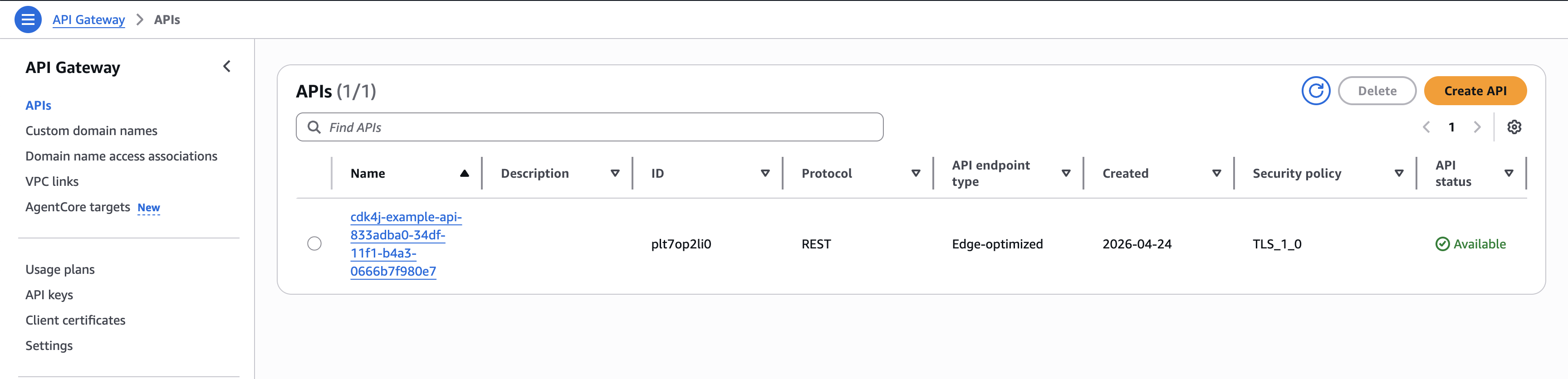
mvn cdk4j:deployAs in the previous examples the console will output the progress of the deployments. Once done successfully the created API can be seen in the API Gateway dashboard
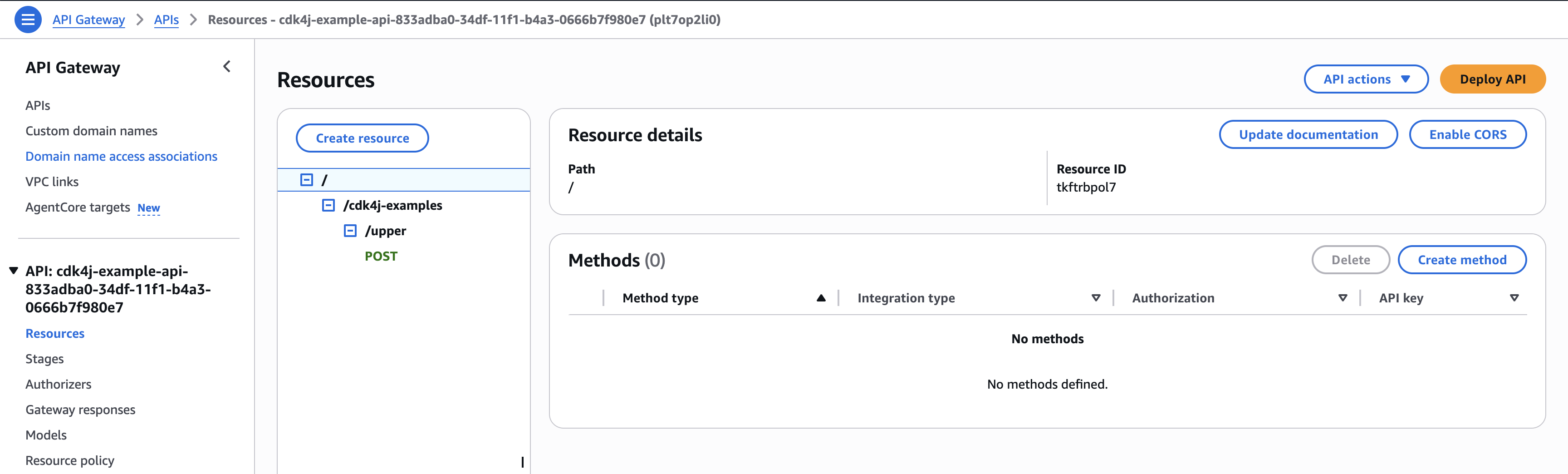
And when we open it we will see the function endpoint as we defined by the annotations.
Test the endpoint
Let’s test the new REST API using Postman to confirm it’s working as expected. We send a text string in the body of the request and then expect the same text back but than in capitals.
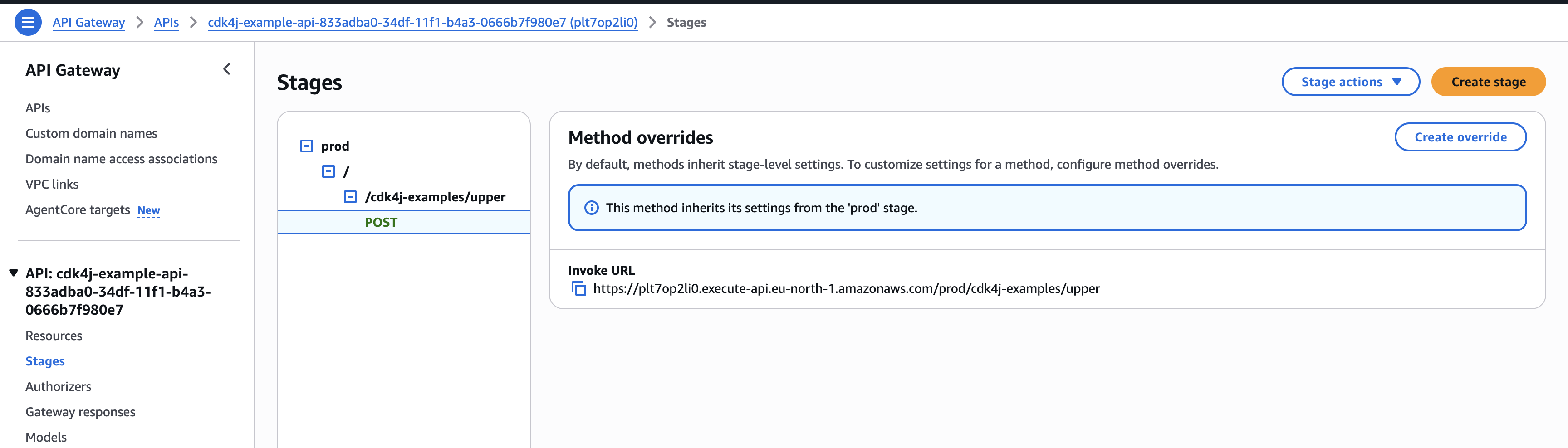
The URL by which the endpoint can be invoked can be found in the stages section under the specific endpoint
Within Postman we can now use the URL to configure a call and execute it
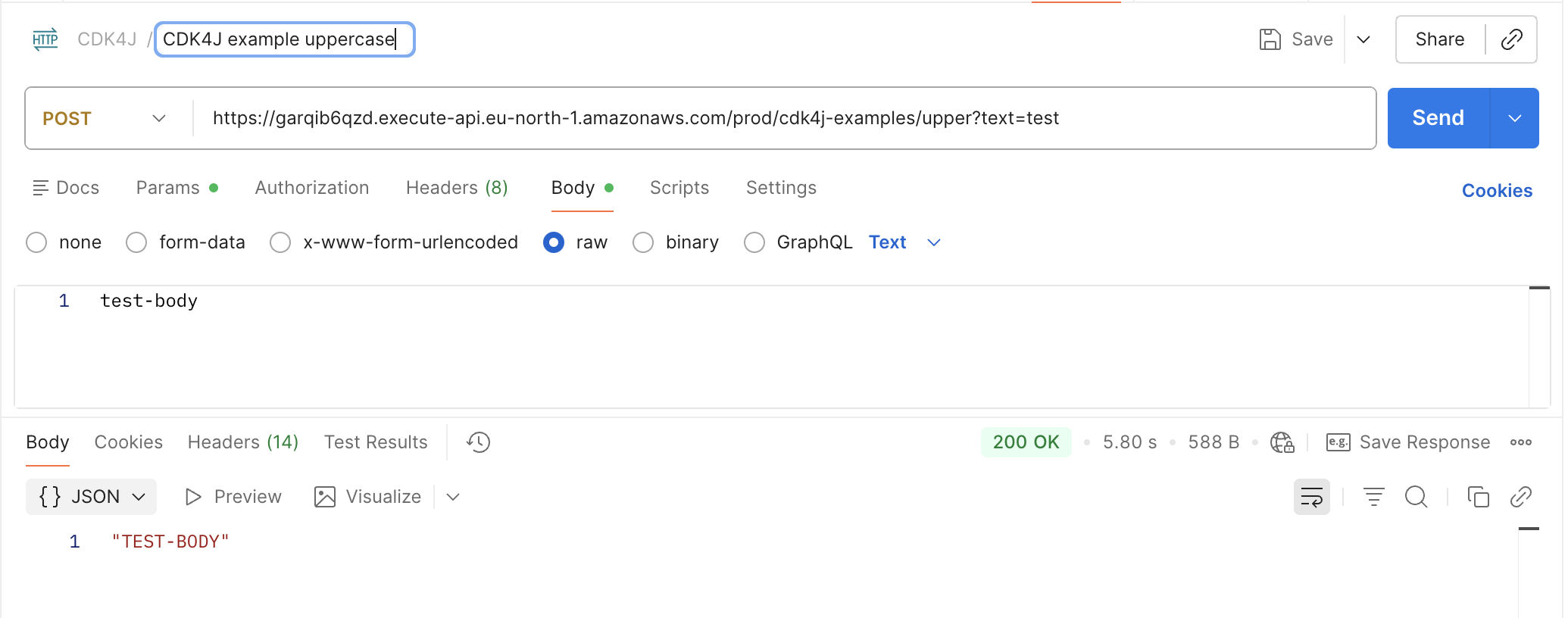
As expected the invocation returns the uppercased text string.
References
https://aws.amazon.com/blogs/devops/build-apis-using-openapi-the-aws-cdk-and-aws-solutions-constructs/ https://medium.com/better-programming/going-serverless-with-spring-cloud-function-aws-lambda-java-17-support-and-snapstart-d3d8ffd44bbd