Deploy Spring Cloud function on AWS Lambda
The Apache Maven Shade plugin as configured in Package Spring Cloud function will produce a deployable JAR file which can be deployed by the CDK4j maven plugin.
However, before we can deploy the Spring Cloud Function, we have to define the infrastructure in which the function will be deployed. For this we will use AWS CDK, an Infra as Code tool for provisioning infrastructure in a repeatable, scalable, and secure way. AWS CDK lets you write cloud infrastructure using Java, but it does not deploy resources directly. For that we will use the CDK4J maven plugin which will prepare your AWS environment, convert the infrastructure code into CloudFormation templates, and provision it to AWS.
In short the following steps will be taken to deploy a Spring Cloud Function:
- You write infrastructure code in Java using AWS CDK
- Bootstraps your AWS environment for usage with the AWS Cloud Development Kit (CDK).
- Convert the infrastructure code into a CloudFormation template.
- Provisions or update the AWS resources. AWS manages dependencies, ordering, and rollbacks.
Write infrastructure code
To define the infrastructure CDK introduces reusable cloud components called constructs that we can combine into stacks, and stacks into an app.
The App is the construct tree root serving as a container for one or more stacks. The CDK app instance is created using the App builder.
package org.datapith.cdk4j.examples.springCloud.infra.aws;

import software.amazon.awscdk.App;
import software.amazon.awscdk.StackProps;

public class Cdk4jSpringCloudApp {

  public static void main(String[] args) {
    App app = App.Builder.create().build();
    new Cdk4jSpringCloudStack(app, "Cdk4jExample", StackProps.builder().build());
    app.synth();
  }

}
Above class acts as the entry point that creates the stack (Cdk4jSpringCloudStack), and synthesizes it to a CloudFormation template.
The CDK stack Cdk4jSpringCloudStack is extending the Stack construct.
package org.datapith.cdk4j.examples.springCloud.infra.aws;

import java.util.Map;
import software.amazon.awscdk.Stack;
import software.amazon.awscdk.StackProps;
import software.constructs.Construct;

public class Cdk4jSpringCloudStack extends Stack {

  public Cdk4jSpringCloudStack(final Construct scope, final String id, final StackProps props) {
    super(scope, id);

    // Define your constructs here
  }
}
We are now ready to define the function by using the L2 construct Function
Function.Builder.create(this, "uppercase")
    .functionName("uppercase")
    // GraalVM specific Runtime
    .runtime(Runtime.JAVA_25)
    .timeout(Duration.seconds(30))
    .memorySize(512)
    .handler("org.springframework.cloud.function.adapter.aws.FunctionInvoker::handleRequest")
    .code(Code.fromAsset("./target/cdk4j-examples-aws.jar"))
    .environment(
        Map.of(
            "MAIN_CLASS", Cdk4jSpringCloudApplication.class.getName(),
            "spring_cloud_function_definition", "uppercase"
        )
    )
    .build();
Like all constructs, the Function class takes three parameters:
scope– Defines your Stack instance as the parent of the Function construct. All constructs that define AWS resources are created within the scope of a stack.Id– The construct ID of the Function within your AWS CDK app. This ID, plus a hash based on the function’s location within the stack, uniquely identifies the function during deployment. The AWS CDK also references this ID when you update the construct in your app and re-deploy to update the deployed resource.props- Values that define properties of the function. Here for example we have defined theruntime,memorySize,handler, etc.
Within the code property we reference the jar that was created by the Apache Maven Shade plugin as configured in Package Spring Cloud function.
As handler we use the built-in org.springframework.cloud.function.adapter.aws.FunctionInvoker to streamline the integration with AWS Lambda. It provides advanced features such as multi-function routing, decoupling from AWS specifics, and POJO serialization out of the box. Please refer to the AWS Request Handlers and AWS Function Routing sections in AWS Lambda function handler learn more.
Bootstrap AWS environment
Bootstrapping prepares your AWS environment by provisioning specific AWS resources in your environment that are used by the AWS CDK. You can use the [CDK4J maven plugin]({{{ref “reference/cdk4j-maven-plugin”>}}) to bootstrap your environment. From the root of your project invoke:
mvn cdk4j:bootstrapThis will start the initialization of your AWS environment and once the AWS environment has been bootstrapped successfully you will see the CDKToolkit stack within the AWS CloudFormation console:

You must bootstrap each AWS environment before you deploy into the environment.
It’s okay to bootstrap an environment more than once. If an environment has already been bootstrapped, the bootstrap stack will be upgraded if necessary. Otherwise, nothing will happen.
Create CloudFormation templates
In this step, you prepare for deployment by synthesizing a CloudFormation template with the CDK4J maven plugin synth command. This command performs basic validation of your CDK code, runs your CDK app, and generates a CloudFormation template from your CDK stack.
If you don’t synthesize a template, the CDK4J maven plugin will automatically perform this step when you deploy. However, we recommend that you run this step before each deployment to check for synthesis errors.
To synthesize a CloudFormation template, run the following from the root of your project:
mvn cdk4j:synthThis command synthesizes the AWS CloudFormation template Cdk4jExample.template.json from your CDK stack in the directory /target/cdk.out
To synthesize your stack you must specify the full class name of the CDK app class defining the cloud infrastructure. In our case the configuration would look as follows
<plugin>
    <groupId>org.datapith</groupId>
    <artifactId>cdk4j-maven-plugin</artifactId>
    <version>LATEST_VERSION</version>
    <configuration>
      <app>org.datapith.cdk4j.examples.springCloud.infra.aws.Cdk4jSpringCloudApp</app>
    </configuration>
    <executions>
      ...
    </executions>
</plugin>
Deploy the infrastructure
We are now ready to provision our infrastructure to AWS by executing:
mvn cdk4j:deployDuring deployment, the CDK4J maven plugin displays progress information as your stack is deployed.
[INFO] Deploying 'Cdk4jExample' stack
[INFO] Waiting until 'Cdk4jExample' reaches stable state
[INFO] +----------------------+----------------------------------+----------------------------------+------------------------------------------------------------------+
[INFO] | Timestamp            | Logical ID                       | Status                           | Status Reason                                                    |
[INFO] +----------------------+----------------------------------+----------------------------------+------------------------------------------------------------------+
[INFO] | 2026-04-10 15:16:40  | Cdk4jExample                     | CREATE_IN_PROGRESS               | User Initiated                                                   |
[INFO] +----------------------+----------------------------------+----------------------------------+------------------------------------------------------------------+
[INFO] | 2026-04-10 15:16:43  | uppercaseServiceRole380FC71B     | CREATE_IN_PROGRESS               |                                                                  |
[INFO] +----------------------+----------------------------------+----------------------------------+------------------------------------------------------------------+
[INFO] | 2026-04-10 15:16:44  | uppercaseServiceRole380FC71B     | CREATE_IN_PROGRESS               | Resource creation Initiated                                      |
[INFO] +----------------------+----------------------------------+----------------------------------+------------------------------------------------------------------+
[INFO] | 2026-04-10 15:17:01  | uppercaseServiceRole380FC71B     | CREATE_COMPLETE                  |                                                                  |
[INFO] +----------------------+----------------------------------+----------------------------------+------------------------------------------------------------------+
[INFO] | 2026-04-10 15:17:02  | uppercase717B33A1                | CREATE_IN_PROGRESS               |                                                                  |
[INFO] +----------------------+----------------------------------+----------------------------------+------------------------------------------------------------------+
[INFO] | 2026-04-10 15:17:03  | uppercase717B33A1                | CREATE_IN_PROGRESS               | Resource creation Initiated                                      |
[INFO] +----------------------+----------------------------------+----------------------------------+------------------------------------------------------------------+
[INFO] | 2026-04-10 15:17:12  | Cdk4jExample                     | CREATE_IN_PROGRESS               | Eventual consistency check initiated                             |
[INFO] +----------------------+----------------------------------+----------------------------------+------------------------------------------------------------------+
[INFO] | 2026-04-10 15:17:12  | uppercase717B33A1                | CREATE_IN_PROGRESS               | Eventual consistency check initiated                             |
[INFO] +----------------------+----------------------------------+----------------------------------+------------------------------------------------------------------+
[INFO] | 2026-04-10 15:17:18  | uppercase717B33A1                | CREATE_COMPLETE                  |                                                                  |
[INFO] +----------------------+----------------------------------+----------------------------------+------------------------------------------------------------------+
[INFO] | 2026-04-10 15:17:19  | Cdk4jExample                     | CREATE_COMPLETE                  |                                                                  |
[INFO] +----------------------+----------------------------------+----------------------------------+------------------------------------------------------------------+
[INFO] The stack 'Cdk4jExample' has been successfully deployed
When complete, you can go to the AWS CloudFormation console to view your Cdk4jExample stack.

Test the function
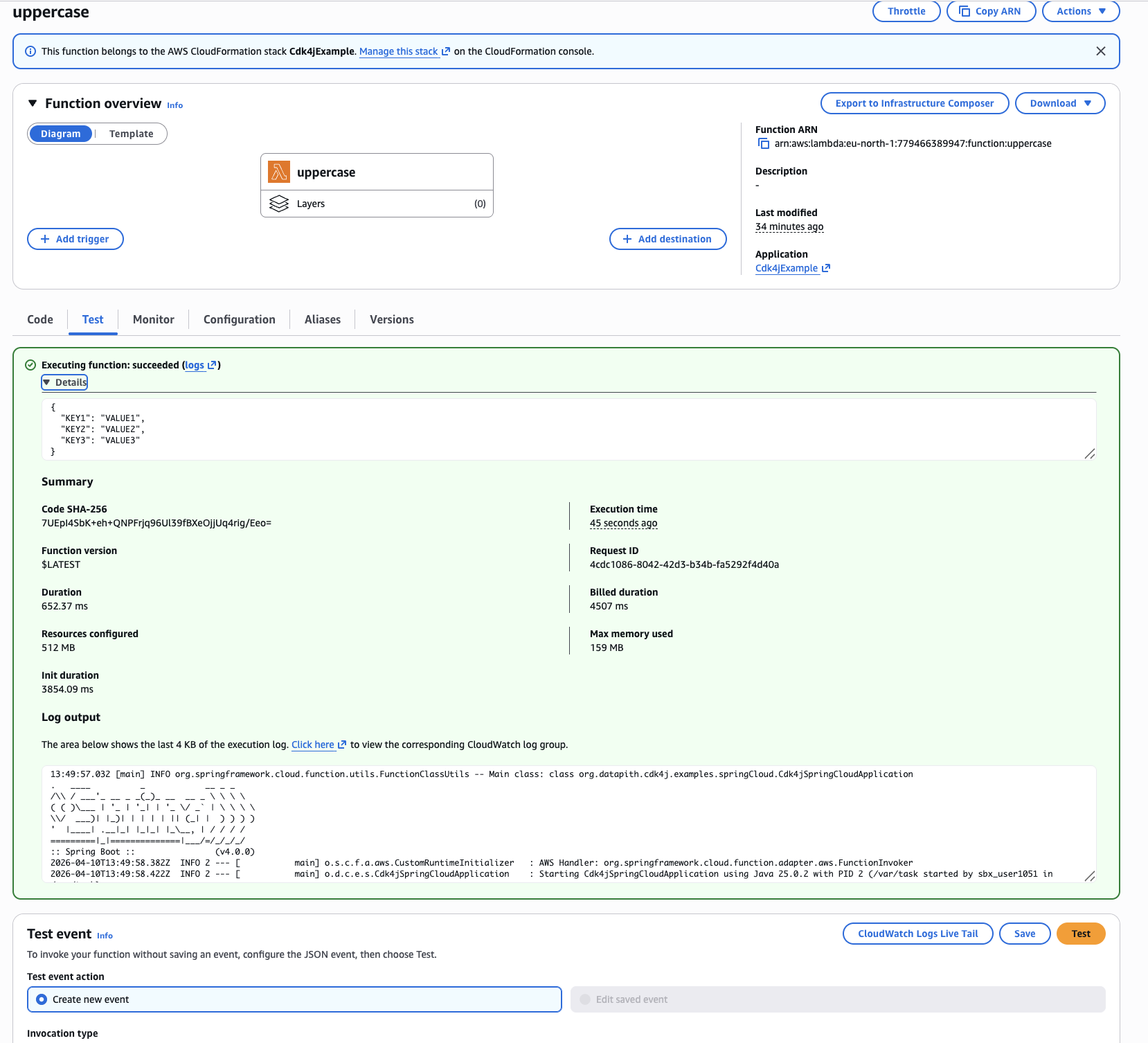
Now that we have successfully deployed our function we can test our Lambda function in the function console by invoking your function with a test event. A test event is a JSON input to your function. To test the function:
- Choose the
uppercasefunction
- Choose the Test tab.
- Under Test event, choose Create new event
- Click on the
Testbutton. - To review the test results, under Execution result, expand Details.